⚠️ Please note: As these are cheap accounts, hiccups are normal (official account is $249/mo). If it has any problem, please send me a screenshot over Skool – It’s the best place to contact me.
And I’ll get back to you asap. If I miss your dm, you can remind me every 24-48h.
In the worst case I’ll give you a shared account for temporary use but NO REFUND is provided. If you’ve worked with me, you know that I always try my best to give the best solution.
Make sure you use VEO3.1 – Fast model as one video consumes only 10 credits while the QUALITY model is 100. The quality is almost the same.
VEO3 Account Login Guidance – @workwithsydney
Step 1: Create a new Chrome profile. Guidance: https://youtu.be/ntkHQpIQ9Fo
Step 2: Login: This is a normal Google account with VEO3 Ultra Feature Upgraded.
Use the details I’ve sent you in Skool.
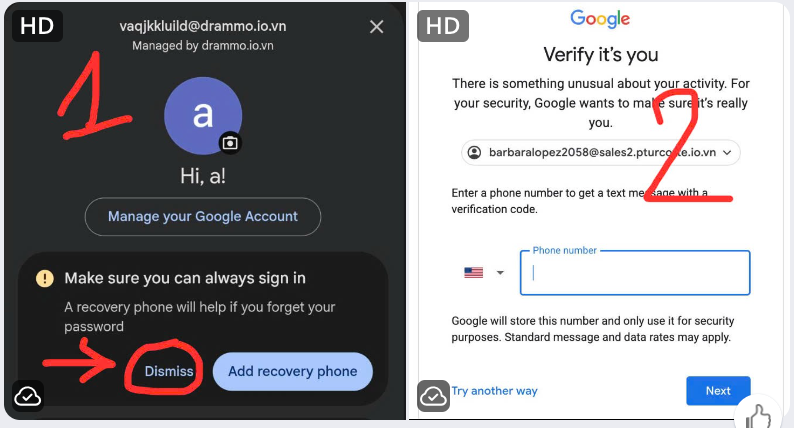
If prompted to add a phone number, DON’T ENTER ONE.
DM me so I have the tech guy to verify for you. (I put the images at the end of this page so you can know what I’m taking about)
Step 3: You can change the account language here:
After you login, click on this link on the same browser.
👉 https://myaccount.google.com/language
Guidance: https://youtu.be/rLWc8jq9GsE
Step 4: Change the password
Click here: https://myaccount.google.com/ and you can see Google password on the left side. Click on it to change then send it to me. That way, if the account runs into any issues, my tech guy can check it right away. Some people change the password and then forget it, so it’s best to send it to me on Skool.
Step 5: Once everything is done, you can go here to start creating now
👉 https://labs.google/fx/tools/flow
⚠️ Important – Please Read
- YOU HAVE TO DOWNLOAD THE VIDEOS RIGHT AFTER CREATING to avoid losing data as this is a cheap account so it may not store the videos for long.
- This account is for one profile only. Do not log in and out on multiple devices, as Google may consider it unusual activity and suspend the account. I cannot provide support if you log in on multiple devices or profiles.
- My support & Credits are active within 30 days starting the day I deliver the account.
If you have any questions, feel free to reach out to me. I might not get back to you right away but it’s often within 48h so please give me some time.
***Important: Google may update, limit, or remove features (including Flow, Veo3.1, Fast mode, or credits) at any time. By purchasing, you acknowledge and understand that these features are controlled by Google and may change without notice.
Best regards,
Sydney Instagram @workwithsydney
For the phone number images in step 2:
If it’s the first image, you can tap on dismiss. Don’t add any number.
If it’s the 2nd image, you can take a screenshot and dm me so my tech guy to verify for you: